
Making Kurbelfahrplan ⚓
27 Jan 2026I recently published Kurbelfahrplan, a FOSDEM schedule app for the Playdate. This was the first project where I’ve been quite happy with using Claude Code for development, and used it much beyond Copilot autocomplete and came closer to vibe-coding.
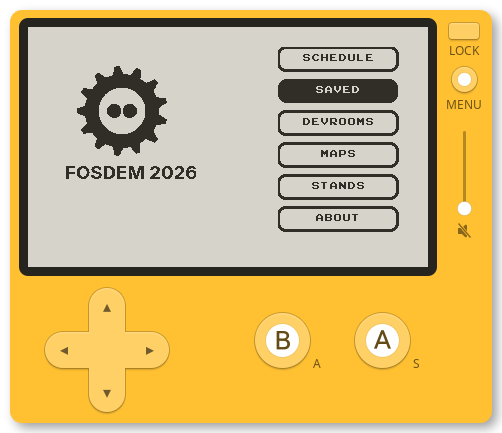
You can see the complete development transcript of my claude-code session. It was interesting as a 2-day greenfield project and I thought it might be nice to document my learnings/process a little bit.
I’d attempted building a game and an app on the playdate before (still WIP) so I had some experience with the tooling. I’d moved on when faced with Lua refactoring challenges1.
This time around, I had a fairly good idea of what the final app would look like: the playdate has a lot of constraints that restrict the design space, and existing apps all have feature parity.
Here’s some of the things I tried:
Specification
Gave a prompt to Gemini Pro and had it generate a SPEC. It included a link to the SDK, a mention of the timezone workaround 2 - I wanted the app to only work in UTC+1 to avoid confusion. I passed it enough context from the schedule.ics file, and on the data storage layer (make separate tables for each Devroom). I don’t have the prompt anymore but it was something like:
write a specification (passed to claude code) for a playdate lua app that will be a fosdem schedule calendar app. See playdate docs at $link. At launch, we want to check the timezone by doing a diff between epochFromTime and epochFromGMTTime, and then download the latest schedule in ICS format from $link. Save the schedule as multiple tables in lua, one table for each category. Create a browser using playdate gridview, display title and location in the first line and a scrollable list of talks below it. Only use the
DTSTART,DTEND,SUMMARY,CATEGORIES,URL,LOCATIONfields from the ICS file. The user should be able to switch the category with left/right as well as the crank Respect shouldDisplay24HourTime on selecting a talk, show a talk details page with the title, and a QR code for the talk.
I corrected the SPEC a bit, and you can see it (very lightly edited since) in the repo
Day 1
I assumed that Claude wouldn’t have enough training data on Playdate APIs, so I went through the SDK docs, and copied out whatever I felt relevant to a txt file. In my case, I didn’t care for video, audio, and most graphics APIs. This turned out to be 89KB of text. Passed it along with the spec to the Opus in the first session, which immediately got lost in trying to fetch the schedule, so I had to wget it and force it to only read 100 lines. The plan it generated looked okay, so I went ahead.
Fixing Bugs and Progress
The first version was buggy (it did compile), but none of the bugs were major and I got it working in a few more prompts and manual fixes.
- The timezone code was incorrect, at the first sight.
- Asked for name suggestions, picked the first one.
- Ran the app on the simulator, and it broke because it tried to use the network permission incorrectly.
- A lot of effort on fixing unicode problems (I attempted to solve this at first on the playdate layer, but moved it to python scripts that fetch and parse the schedule).
- Launched the app on device to realize: Parsing a really large ICS file times out on the device, and generating QR codes takes 15-20 seconds. Switched both to build time. The playdate docs suggest pre-generating QR codes.
- Lots of layout bugs. In particular, the talk text on the schedule list was never visible and no prompting fixed it - it assumed a black/white color and paint mode bug. I went in and looked and the font height was generated and was too low. This was however expected in the absence of a fast feedback loop.
- I’d often write one-time scripts with a prompt like:
Write a Python script inside scripts directory that has zero dependencies, fetches https://fosdem.org/2026/schedule/ical, parses the ICS and saves it as a large JSON array of arrays. Each item in the large array is a event. The event is represented as a list of [ID, SUMMARY, CATEGORIES,LOCATION,DTSTART,DTEND] ID is extracted from the URL (https://fosdem.org/2026/schedule/event/L3BK7S-free-as-in-burned-out/ -> L3BK7S). We do not use any keys to compact space. - Decided to remove the Network Sync code, since I could not parse the fetched content at runtime anyway.
- Generated a
HACKING.mdto document the code so i can pick up the session. - Fixed a few more silly state bugs.
Day 2 Progress
I decided to tackle the harder problems, and they were one-shotted fairly nicely:
- A Devroom configuration page to configure which rooms to show.
- Create a stands browser
- Have a home page landing UI.
- Maps View
- Saved talks
- About Page (inheriting the work from the Talk View)
The code for all of these features is not very elegant, but I didn’t care that much - it was functional and performant for an app that nobody uses beyond 2 days.
Maps
I attempted to resize and clean up the maps manually but it was too much effort (Building H map in the app is mine). Then went with Gemini Pro to get a dithered map out instead, which wasn’t perfect either and looked worse at being scaled down. Switched to a “pan view” instead and that worked okay. Still not very happy here3 - I might switch to the maps that are used in the FOSDEM iOS app instead.
Overall Notes
I’d rate Claude’s contribution at somewhere around 60% - I found it faster to manually fix lots of bugs (also realizing that there is an extra overhead in understanding the code before I can actually fix it). However, things where I don’t have experience - Game state management, input handling - I was able to rely on Claude to get it mostly right. I used Opus throughout the project, and this is the first model where it writes code that is similar in shape to what I’d write.
See you at FOSDEM?
If you’d like to try the app, come say Hi at FOSDEM. I’ll be at the FOSS United Booth in Building K, Level 2. Or drop me a message. Bug reports are accepted in person only. Kurbelfahrplan is Beerware, so buy me a beer if you like it!
-
I wanted to switch from my custom list view to the gridview in the Playdate SDK and it took me too much time and effort to make the refactor work. ↩
-
There is no way to get timezone in the playdate lua SDK, so you need a workaround. ↩
-
One of my ideas is to switch to a leaflet maptile renderer instead and pre-fetch all tiles from https://nav.fosdem.org/. ↩
Published on January 27, 2026